

A new law firm website can improve messaging, usability, and lead generation. It can also disrupt organic visibility if important URLs, content, links, or tracking are changed without a migration plan.
That risk does not mean a firm should avoid redesigning. It means the redesign should be treated as both a website project and an SEO migration. Design, development, content, analytics, and search decisions need to be coordinated before launch—not repaired one at a time afterward.
This law firm website migration SEO checklist explains what to preserve, what to test, and what to monitor when a firm moves to a new design, CMS, host, URL structure, or domain. It cannot guarantee unchanged rankings. Significant site changes can cause temporary fluctuations while search engines recrawl and reprocess affected URLs. A careful migration reduces preventable problems and makes unexpected ones easier to diagnose.
What Counts as a Law Firm Website Migration?
Not every redesign creates the same SEO risk. Start by defining what will actually change.
Visual redesign with the same URLs
The site may receive a new theme, layout, or page design while keeping the same domain and URL structure. This is usually less complex than a domain move, but it can still affect headings, internal links, page copy, structured data, mobile rendering, speed, and conversion tracking.
CMS or hosting migration
Moving from one content management system or host to another may leave public URLs unchanged. Even so, the new platform can alter canonicals, redirects, robots directives, sitemap output, image paths, or JavaScript rendering. Infrastructure-only moves should be tested differently from moves that also change URLs.
URL structure change
Changing page paths—for example, moving a practice page to a new folder—requires a one-to-one mapping from each valuable old URL to the most relevant new URL. This is where careless bulk redirects often create lost relevance, chains, loops, or poor user experiences.
Domain or protocol move
A move to a different domain is the highest-impact version of a migration. It affects every URL and requires additional verification, Search Console planning, redirect coverage, and careful monitoring.
If a project combines several of these changes, treat it as a coordinated migration rather than a routine redesign.
Start With an Evidence-Based Content and URL Inventory
Before anyone builds redirects or removes pages, create a complete inventory of the current site. A crawl is useful, but it should be combined with CMS exports, XML sitemaps, analytics, Search Console data, backlink information, and business knowledge.
Record at least:
- current URL and status code;
- page title, H1, meta description, and canonical;
- indexability and robots directives;
- content type and intended search intent;
- organic impressions, clicks, landing-page traffic, and conversions where available;
- backlinks and important internal links;
- primary topic, practice area, and location relevance;
- proposed destination URL; and
- final migration action.
A structured law firm content audit helps determine which pages should move intact, receive a substantive update, be consolidated, or be reviewed for retirement. Make those decisions before launch so development is not forced to improvise URL destinations under deadline pressure.
Build a One-to-One URL Map
Every old URL that matters should have a documented outcome. The strongest default is to preserve a working URL when its topic and purpose remain the same. A redesign alone is not a reason to change a mature path.
When a URL must change, map it to the closest intent-matched destination. Avoid sending every removed page to the homepage or a broad practice-area page when a more relevant replacement exists. A redirect should help both the visitor and the search engine understand where the content moved.
The map should identify:
- old URL;
- new URL;
- reason for the change;
- redirect type to be implemented after approval;
- content or metadata to transfer;
- internal links that require updating; and
- owner responsible for testing.
Redirect creation and published URL changes are high-risk production actions. They should be reviewed, approved, and tested individually or in controlled batches. The goal is a direct path from the old URL to the final destination, without unnecessary chains or loops.
Preserve Valuable Content and Page Signals
A polished design can still perform poorly if valuable content is shortened, hidden, or detached from its search intent. During template migration, compare the old and new versions of each important page.
Preserve or deliberately improve:
- the main topic and user intent;
- useful legal explanations that have been reverified;
- title tags, headings, and descriptions where they still fit;
- prominent internal links and contextual anchors;
- images, captions, and descriptive alternative text;
- attorney-review or authorship information when accurate;
- visible trust information that can be substantiated;
- conversion paths, forms, and calls to action; and
- relevant structured data supported by visible page content.
Do not copy outdated legal statements simply because the old page ranked. Any deadline, eligibility rule, court procedure, agency instruction, or jurisdiction-specific proposition should be checked against an authoritative current source before it is carried forward.
The migration is also a chance to align content and design. The firm’s law firm website design should support clear reading, accessible navigation, core services, and a natural next step without obscuring the information that brought the visitor to the page.
Prepare a Safe Staging Environment
The staging site should be protected from accidental public indexing without preventing the project team from testing it. Access controls are usually safer than relying only on a robots directive. Whatever method is used, document how it will be removed or changed at launch.
Before approval, crawl staging and test:
- page titles, headings, canonicals, and robots directives;
- status codes and redirect behavior;
- navigation, breadcrumbs, and contextual internal links;
- XML sitemap generation;
- desktop and mobile layouts;
- image loading, alt text, and media URLs;
- forms, phone links, and conversion events;
- analytics and tag-manager configuration;
- structured data output where used; and
- custom 404 behavior.
A common failure is carrying a staging noindex directive onto the live site or pointing live canonicals back to staging. These checks deserve explicit launch ownership.
The Three-Phase Law Firm Website Migration Checklist
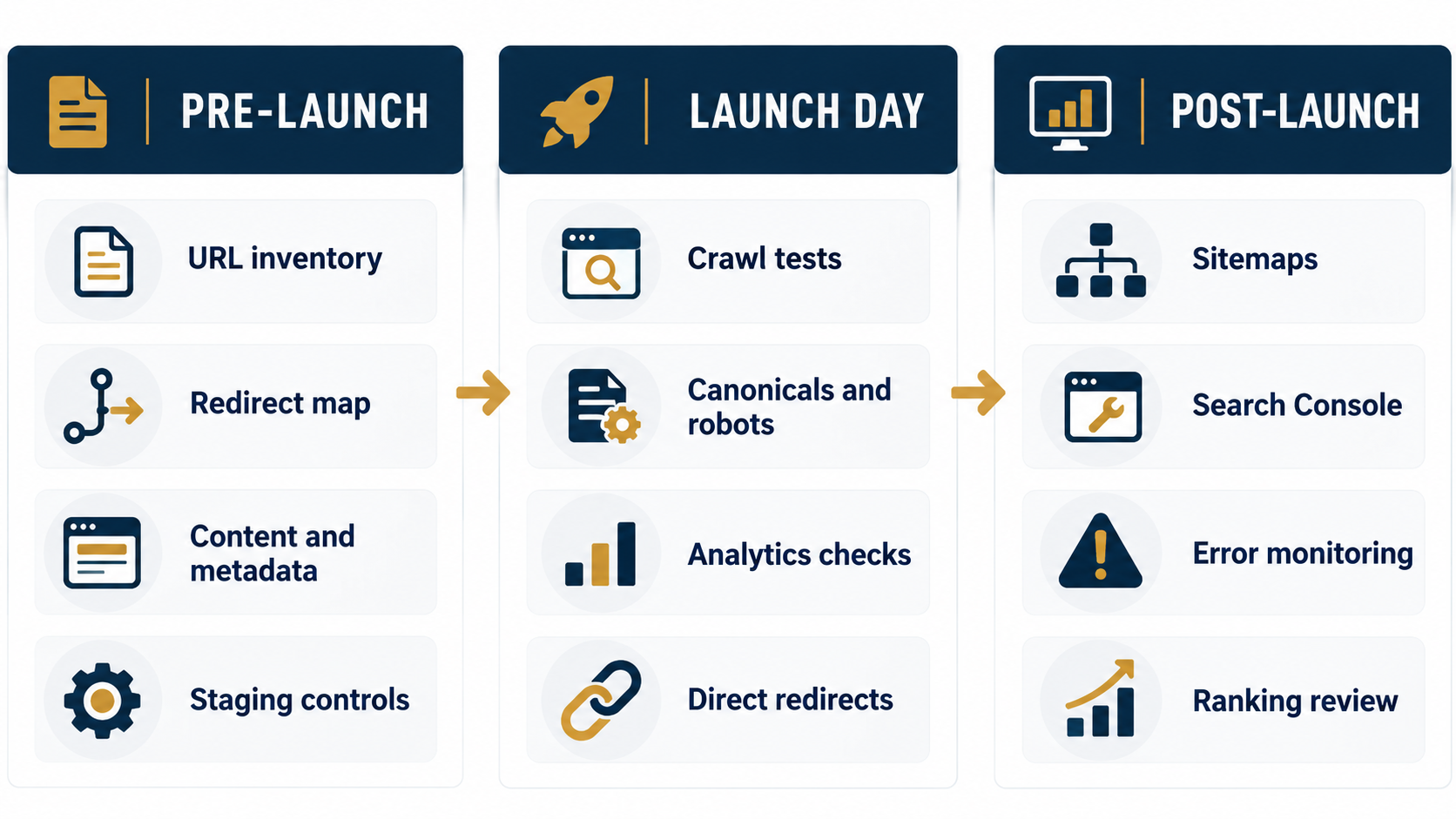
Pre-launch
- Define the exact migration type and scope.
- Crawl and export the current site.
- Preserve performance and conversion benchmarks.
- Complete the content audit and URL map.
- Review all proposed redirects and obtain approval.
- Reverify accuracy-sensitive legal content.
- Crawl staging and resolve broken links or unexpected directives.
- Confirm analytics, call tracking, forms, and consent tools.
- Create a launch checklist with named owners and rollback steps.
Launch day
- Confirm the intended domain and HTTPS version resolve correctly.
- Remove staging-only access or indexing controls from production.
- Test representative old URLs and important redirect mappings.
- Crawl priority templates and high-value pages.
- Check canonicals, robots directives, and status codes.
- Verify primary navigation and conversion paths.
- Confirm analytics and form submissions are recording correctly.
- Publish and validate the correct XML sitemap.
- Check for unexpected server errors or security warnings.
- Record the launch state and any approved exceptions.
Post-launch
- Monitor crawl errors, indexing reports, and sitemap processing.
- Compare priority queries and landing pages with the baseline.
- Watch for redirect chains, soft 404s, and orphaned pages.
- Review analytics for sudden tracking gaps or conversion changes.
- Fix internal links that still point through redirects.
- Investigate material changes by template, directory, or page type.
- Maintain a change log so each correction can be evaluated.
Search Console and Sitemap Steps
Verify access to all relevant Search Console properties before launch. After the live migration, submit the current sitemap and inspect a representative group of priority URLs. For a domain move, Google provides a Change of Address workflow, but it should be used only when the site and redirects are ready and the migration actually meets the tool’s requirements.
Google’s official site-move guidance emphasizes URL mapping, server-side permanent redirects, internal-link updates, sitemap submission, and continued monitoring. It also notes that meaningful site changes can produce temporary ranking fluctuations. No one should promise a universal recovery timeline because the scope, crawl frequency, site authority, and quality of implementation differ.
Measure the Migration as a Business Project
Rankings are important, but they are not the only measure of a successful law firm website. Review qualified calls, form submissions, consultation requests, service-page engagement, and the paths visitors use before converting.
A law firm marketing dashboard can organize the pre- and post-launch comparison. Segment results by page type and intent so a problem affecting one template is not mistaken for a sitewide decline.
This work should fit within a broader law firm SEO process that connects technical quality, content relevance, authority, and lead measurement. A migration is not finished when the new design appears. It is finished when the site is crawlable, measurable, accurate, and functioning as intended.
Common Migration Mistakes to Avoid
- changing every URL for cosmetic consistency;
- launching without a complete old-to-new URL map;
- redirecting unrelated pages to the homepage;
- copying obsolete or jurisdictionally inaccurate content;
- removing useful copy to simplify a design;
- leaving live pages noindexed or canonicalized to staging;
- blocking resources needed to render the page;
- failing to update internal links and image paths;
- publishing a sitemap with old, redirected, or noncanonical URLs;
- changing the domain, CMS, copy, and information architecture without isolating risks; and
- judging success from one ranking check instead of a monitored baseline.
Plan the Migration Before Development Is Finished
The best time to protect SEO is before the launch date becomes urgent. Inventory the current site, preserve evidence, map URLs, test staging, assign ownership, and define what a successful launch looks like.
LawPronation helps law firms align website strategy, legal content, technical SEO, and performance reporting. If your firm is planning a redesign or migration, book a strategy conversation before changes reach production.